Dashboard
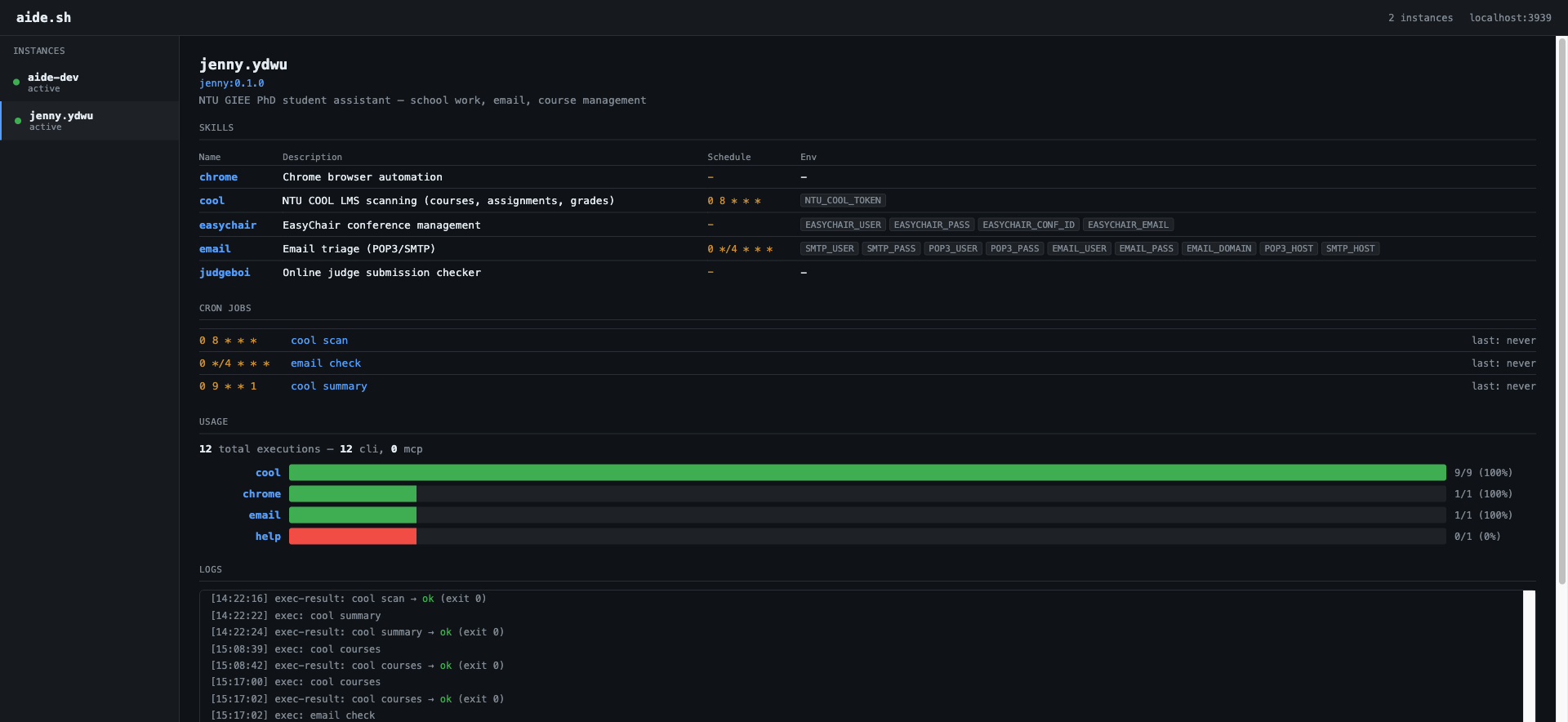
aide.sh includes a built-in web dashboard for monitoring agents.
Quick start
aide.sh dash                  # standalone dashboard
aide.sh up                    # daemon + cron + dashboard
aide.sh up --no-dash          # daemon without dashboard
Dashboard serves at http://localhost:3939.
Panels
- Instances — sidebar listing all agents with status dots (green = active)
- Skills — table with name, description, cron schedule, env vars
- Cron Jobs — schedule, skill name, last run time
- Usage — per-skill execution bars with success/fail ratio, CLI vs MCP breakdown
- Logs — real-time log tail with auto-refresh (3s polling)
API
# List all instances
curl http://localhost:3939/api/instances

# Instance detail (skills, cron, metadata)
curl http://localhost:3939/api/instance/jenny.ydwu

# Logs (latest N lines)
curl http://localhost:3939/api/logs/jenny.ydwu?tail=50

# Usage analytics
curl http://localhost:3939/api/stats/jenny.ydwu
Stats response
{
  "total_execs": 12,
  "by_skill": {
    "cool": { "count": 9, "success": 9, "fail": 0 },
    "email": { "count": 1, "success": 1, "fail": 0 }
  },
  "by_source": { "cli": 12, "mcp": 0 }
}